smart · Connected Car Mobile App
smart Connected Car App Design
As Experience Design Lead at Deloitte Digital, I helped shape smart's native EV companion app before key vehicle behaviours, backend logic, and partner integrations had settled.
The core design challenge was trust: drivers needed to know what the app knew, what the car had done, and what to do when pairing, charging, climate, or remote-control states changed.
- Project type
- Native iOS and Android connected-car companion app
- Role
- Experience Design Lead, Deloitte Digital Germany
- Scope
- Research synthesis, IA, state flows, prototypes, testing, and delivery support
- Stage
- Pre-launch engagement; app later shipped after my involvement

The Problem
Design the companion app before the car existed
The team had to define how a driver would pair a phone, trust vehicle access, read charging status, control climate, manage geofences, and recover when app, car, account, or backend states did not line up.
- smart was defining the car and companion app in parallel, so UX had to describe access, status, remote-control, and ownership moments before hardware behaviour had settled.
- smart was moving away from the physical key, so pairing, access, phone-key behaviour, and remote commands had to earn trust.
- Drivers needed immediate feedback on charging, climate, range, readiness, and vehicle status.
- Partner integrations across public charging, wall box charging, maps, and backend systems kept requirements moving during implementation.
My Role
Lead the UX work that product and delivery teams could use
I worked on a year-long programme with Deloitte Digital Germany and Portugal, smart product owners, engineering, QA, scrum, and delivery partners. My role was to turn research, requirements, and shifting constraints into UX artefacts the team could make decisions from.
What I led
- Research synthesis from EV-owner interviews, survey input, and connected-car landscape analysis
- Information architecture, navigation, user flows, wireframes, and prototypes for core vehicle moments
- Testing plans, scripts, facilitation, synthesis, and design iteration
- Implementation support through flow artefacts, requirements clarification, and prioritisation conversations
How the work helped the team decide
- smart product owners used the artefacts to connect business priorities with user needs and delivery constraints
- Engineering, QA, scrum, and Deloitte delivery teams used flows to discuss states, dependencies, and edge cases before build
- Final UI, technical implementation, QA, and release readiness remained shared across the broader design, engineering, and delivery team
The programme ran for a year with a fifteen-person scrum team and a new smart product-owner group. Because requirements kept moving, the UX artefacts had to do more than document screens: they gave product, engineering, QA, and delivery partners a shared way to review decisions before build.
Research
Start with how EV drivers manage control and confidence
The research work turned a broad connected-car brief into clearer user needs around range, charging, reliability, visibility, and readiness. It informed direction rather than proving market outcomes.
- I sourced and interviewed five EV owners across Europe to understand how they managed charging, range anxiety, vehicle status, and control.
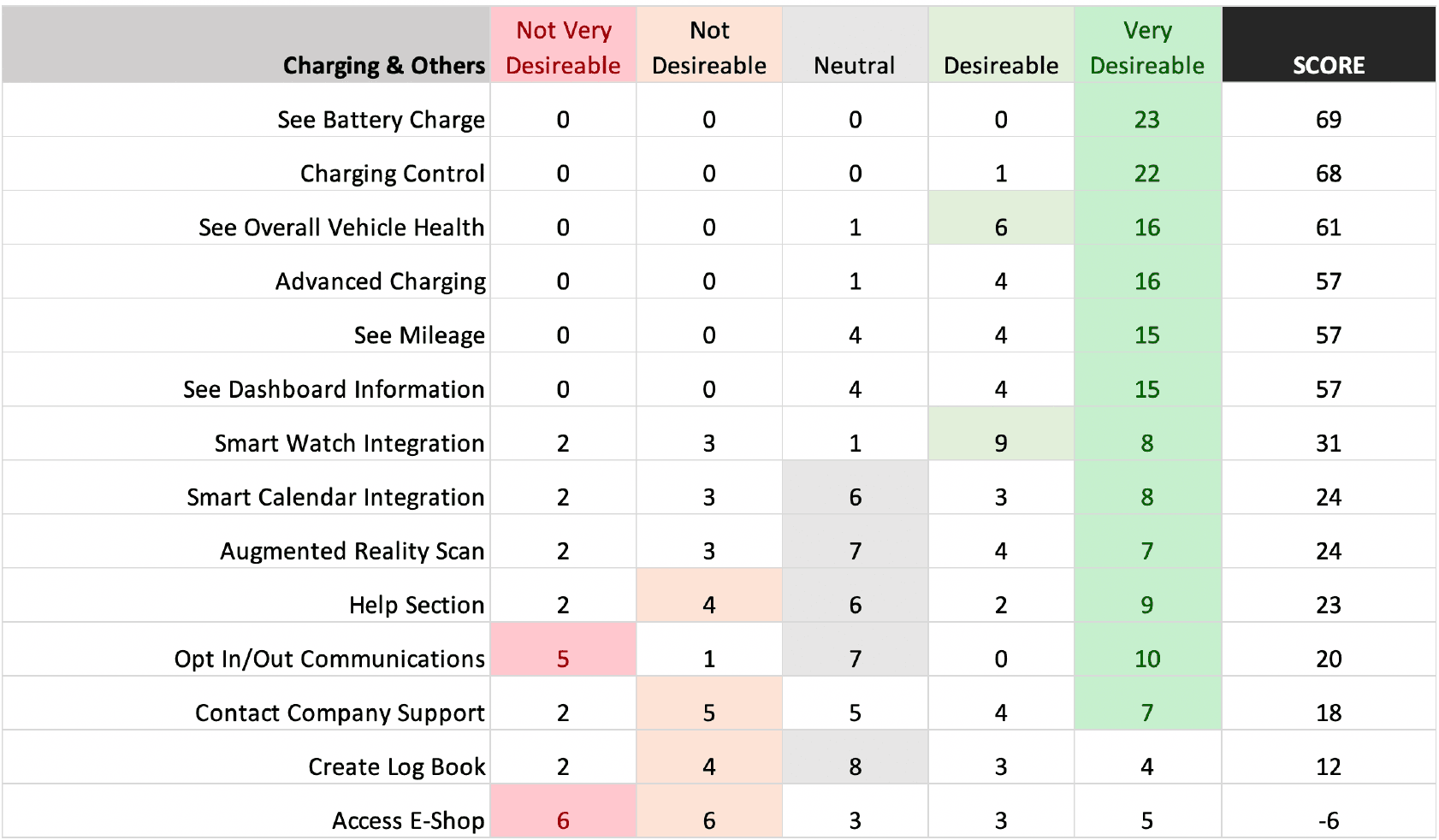
- Survey input from EV communities helped prioritise planned features from a user perspective rather than relying only on internal assumptions.
- A landscape review of 14 connected-car apps clarified feature coverage, navigation patterns, and expectation gaps in the market.
- The research pointed toward a practical core: drivers needed better visibility and control over when, where, and how their vehicle would be charged and ready.
What research changed
- Vehicle status and charging had to sit closer to the front of the experience because they shaped driver confidence.
- Climate and remote controls needed clearer hierarchy and feedback because users were acting on a vehicle they could not always see.
- The IA needed to group the broad feature set around driver jobs rather than internal workstreams or partner systems.
prioritisation
journey map
.11n0ye9e4i14_.png&w=3840&q=75)
Product Decisions
Key Product Decisions
The central design move was to organise the app around the driver's recurring jobs while making state logic explicit enough for product, engineering, QA, and delivery partners to review.
01
Make vehicle status the home-screen anchor
EV owners treated battery, range, charging, and readiness as confidence signals. I pushed those signals toward the front of the experience instead of hiding them in controls. The tradeoff was keeping the home screen scannable without turning it into a dashboard of every vehicle state.
02
Treat charging as a confidence journey, not a utility
Survey input and the competitor review showed that charging shaped planning, not only setup. Charging stayed visible as a core journey across status, cost, range, public charging, and readiness. The IA had to support routine checks without burying deeper charging details.
03
Separate frequent remote actions from deeper controls
Locking, climate, and remote commands could affect a vehicle the driver could not see. I separated frequent actions from lower-frequency controls and treated feedback states as part of the interaction. The tradeoff was giving drivers enough control without making the default screen feel like a control drawer.
04
Turn pairing, geofence, and edge-state logic into buildable flows
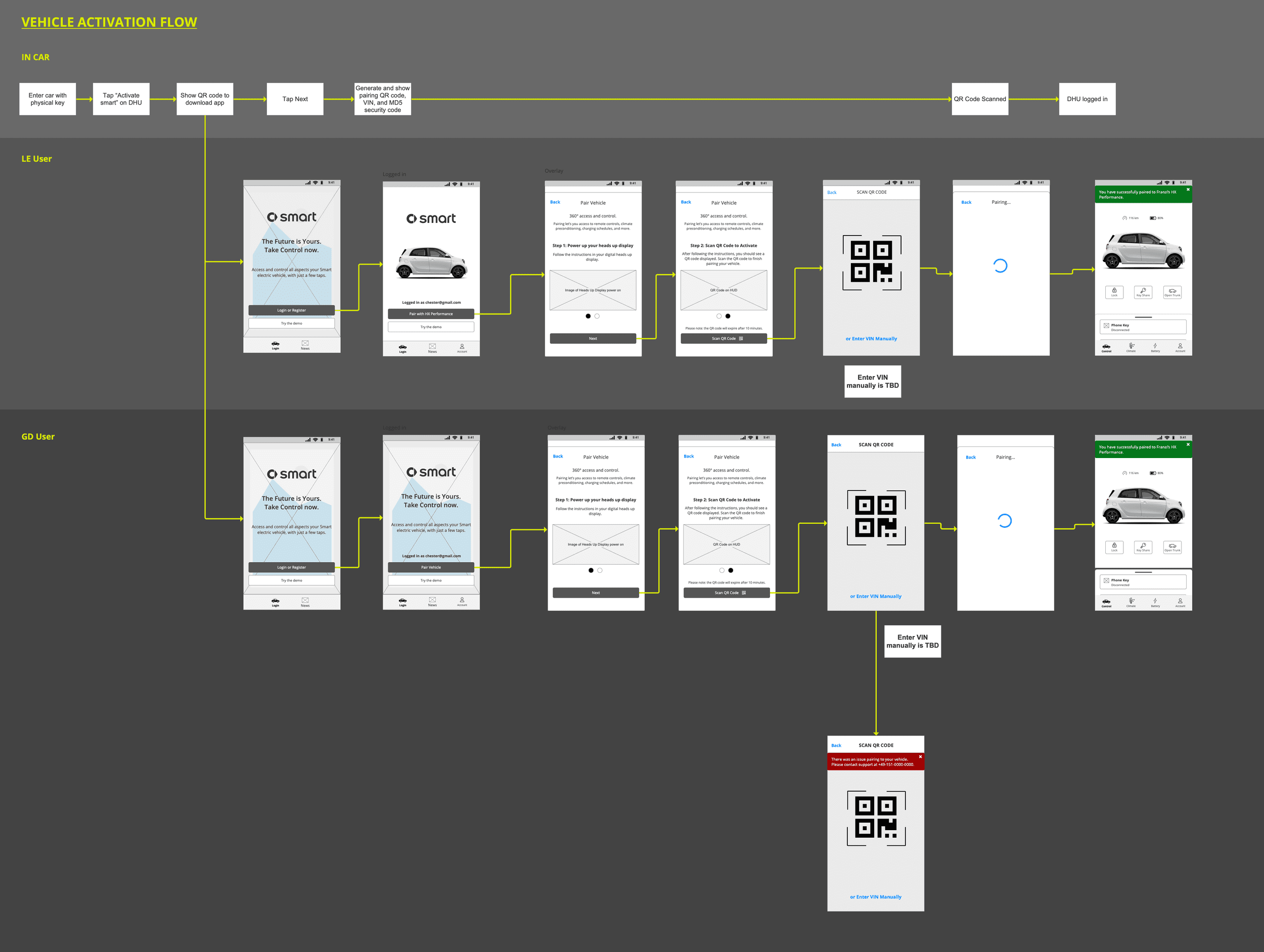
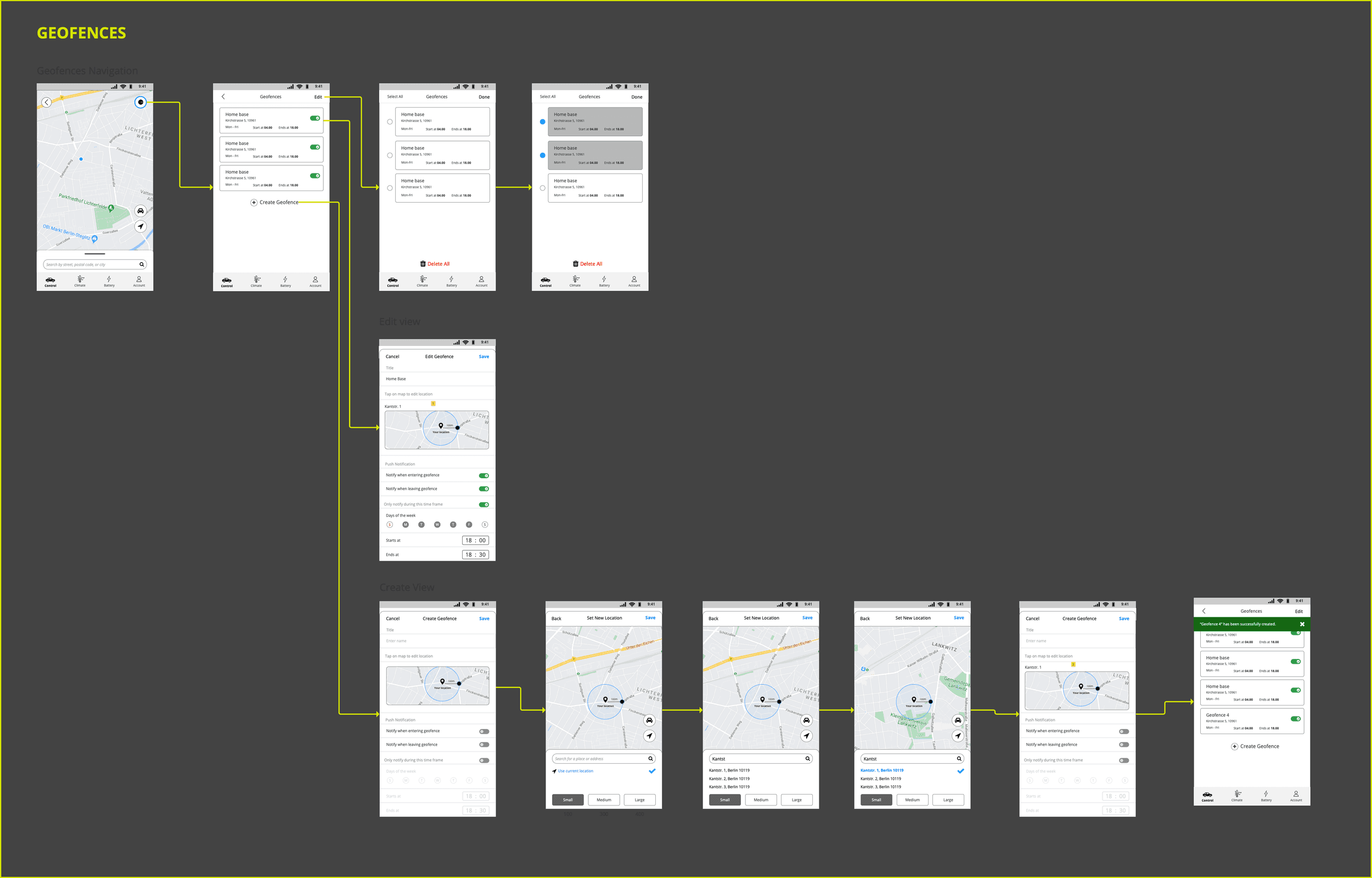
Pairing, QR activation, saved places, geofence edits, notification preferences, and error paths crossed app, account, vehicle, and backend logic. Detailed flows gave product owners, engineers, and QA a shared way to discuss edge cases before build.
IA proof
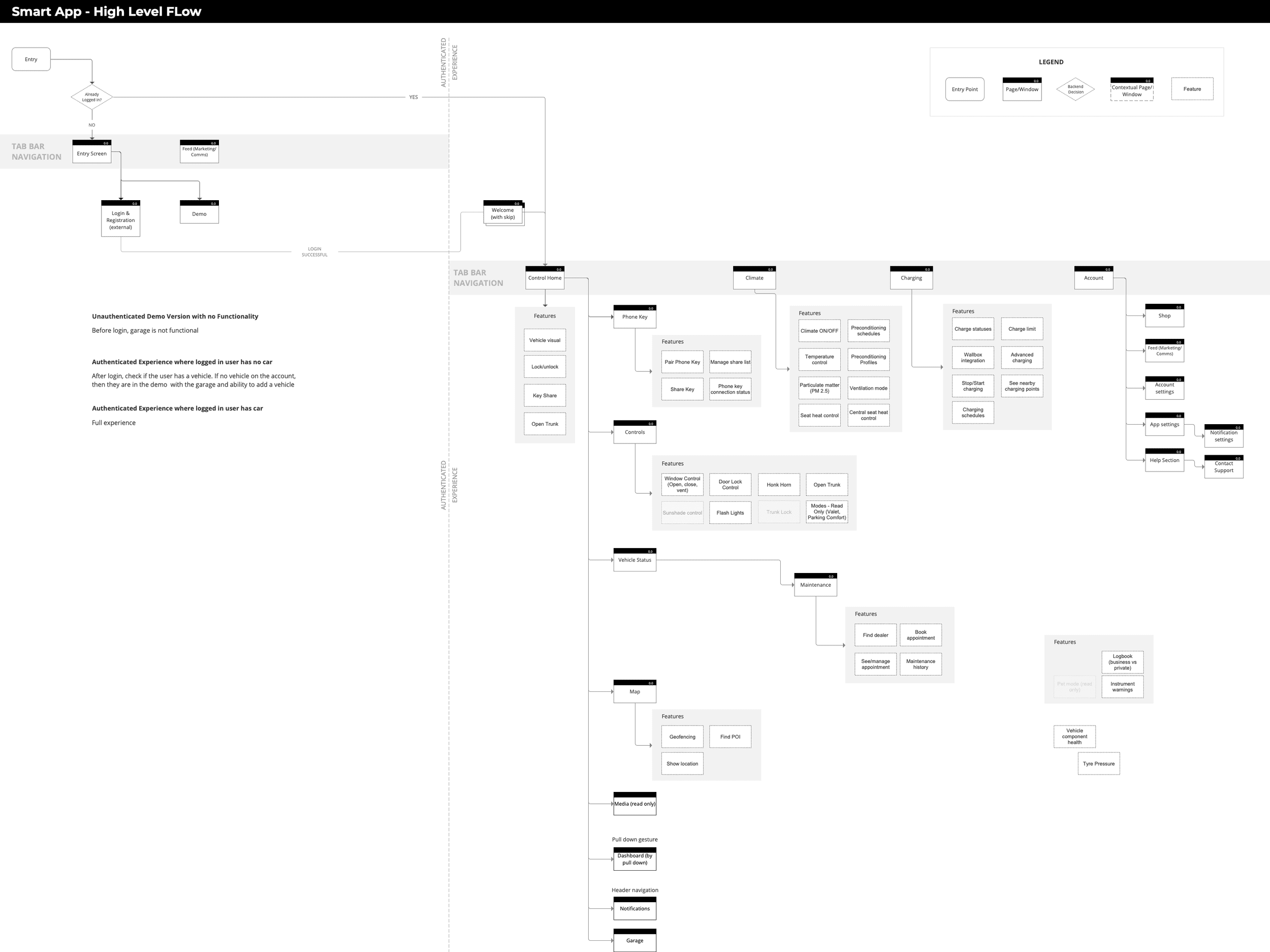
What changed in the designs
Home moved from feature access to status confidence
Earlier pressure
The early home direction had to represent a wide connected-car feature set.
Later direction
The later direction put vehicle status, readiness, and everyday controls closer to the default surface.
Controls moved from dense drawer to clearer hierarchy
Earlier pressure
The controls concept initially carried more actions than the default view could explain well.
Later direction
Research, testing, and team review moved lower-frequency actions into more appropriate sections.
Navigation elevated the driver jobs that shaped confidence
Earlier pressure
The app could have followed internal workstreams, partner systems, or feature categories.
Later direction
Vehicle control, climate, and charging moved into the primary structure because drivers looked for them in live vehicle moments.
Technical UX
Trust-critical states shaped the UX
Risk sat in the moments where a driver could lose trust: a phone would not pair, a command took time, a geofence needed permission, or charging status depended on systems outside the app.
Pairing and activation
- Risk
- A driver cannot trust the phone-key experience if account, car, QR, or in-car confirmation states do not line up.
- Design response
- Map pairing as a sequence across account state, QR scanning, in-car confirmation, failed pairing, and successful vehicle connection.
- Artifact
- Vehicle pairing flow
Remote command feedback
- Risk
- A driver can doubt whether the car responded when lock, climate, or remote-control actions take time.
- Design response
- Treat vehicle actions as state changes that need confirmation, delay handling, and recovery paths.
- Artifact
- Remote-control and state flows
Charging and readiness
- Risk
- A driver loses confidence when battery, range, charging, and climate readiness sit too far from planning moments.
- Design response
- Keep battery, range, charging status, and climate readiness close to the driver's main decision points.
- Artifact
- IA flow and core screen concepts
Geofence and permissions
- Risk
- A driver may not understand why location access, saved places, and notifications matter to the feature.
- Design response
- Connect saved places, edit states, notification preferences, permission logic, and success feedback in one flow.
- Artifact
- Geofence workspace
Delivery
Move from concepts to flows the team could build
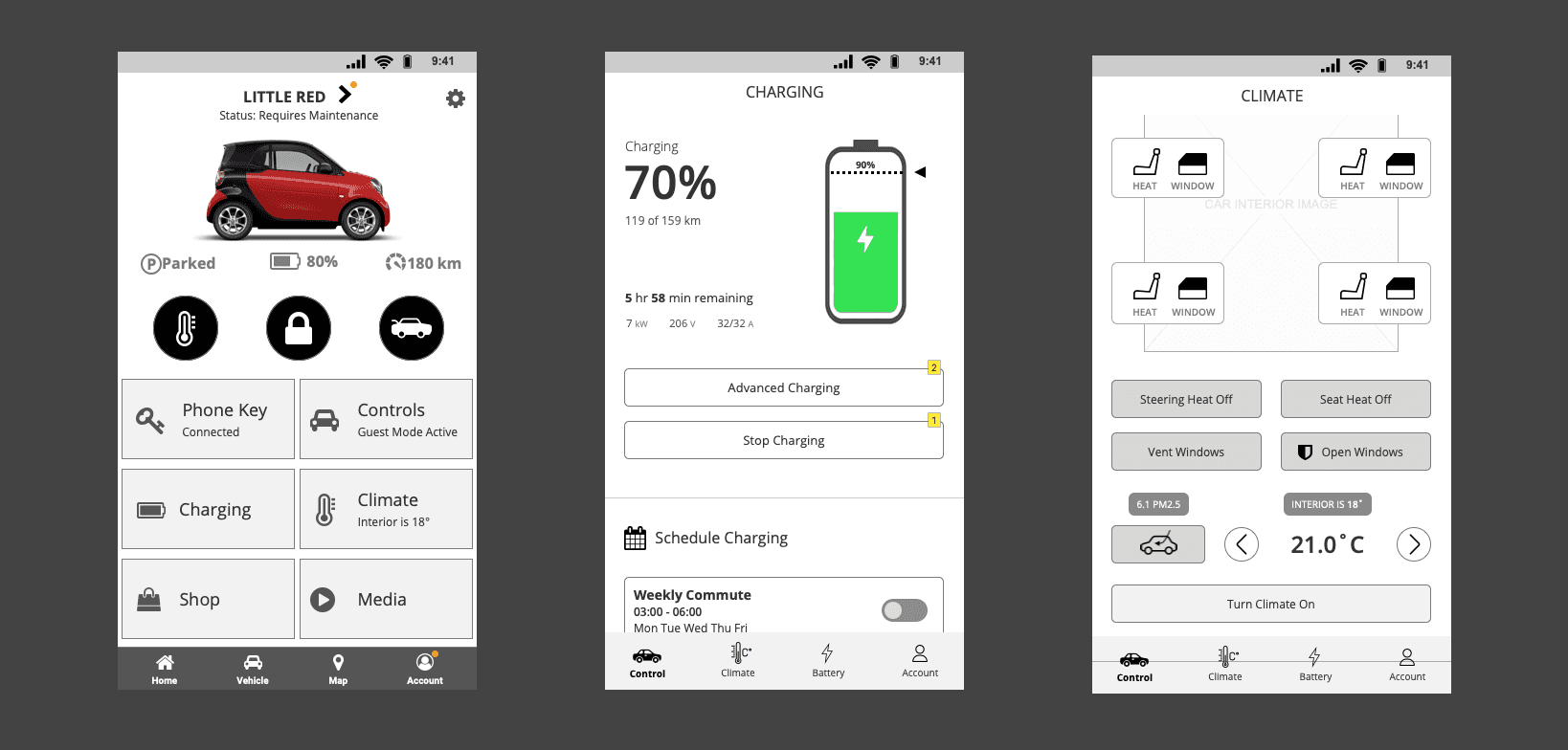
The work became concrete through state diagrams, wireframes, click dummies, and concept screens for high-risk flows such as pairing, geofencing, charging, climate, and remote vehicle control.
Flows made risk visible
Pairing, geofencing, charging, climate, and remote controls depended on state changes across the app, vehicle, account, and backend systems. Flow artefacts helped the team review those dependencies before build.
Concepts tested hierarchy
Early home, charging, and climate directions moved into wireframes and click dummies. Product-owner feedback, feasibility checks, and user testing helped narrow the hierarchy.
Testing sharpened comprehension
Testing checked whether drivers understood the structure, control hierarchy, and vehicle-status language. Findings informed navigation, screen hierarchy, and control clarity before implementation continued.
Pairing flow
Geofence flow
Concept development
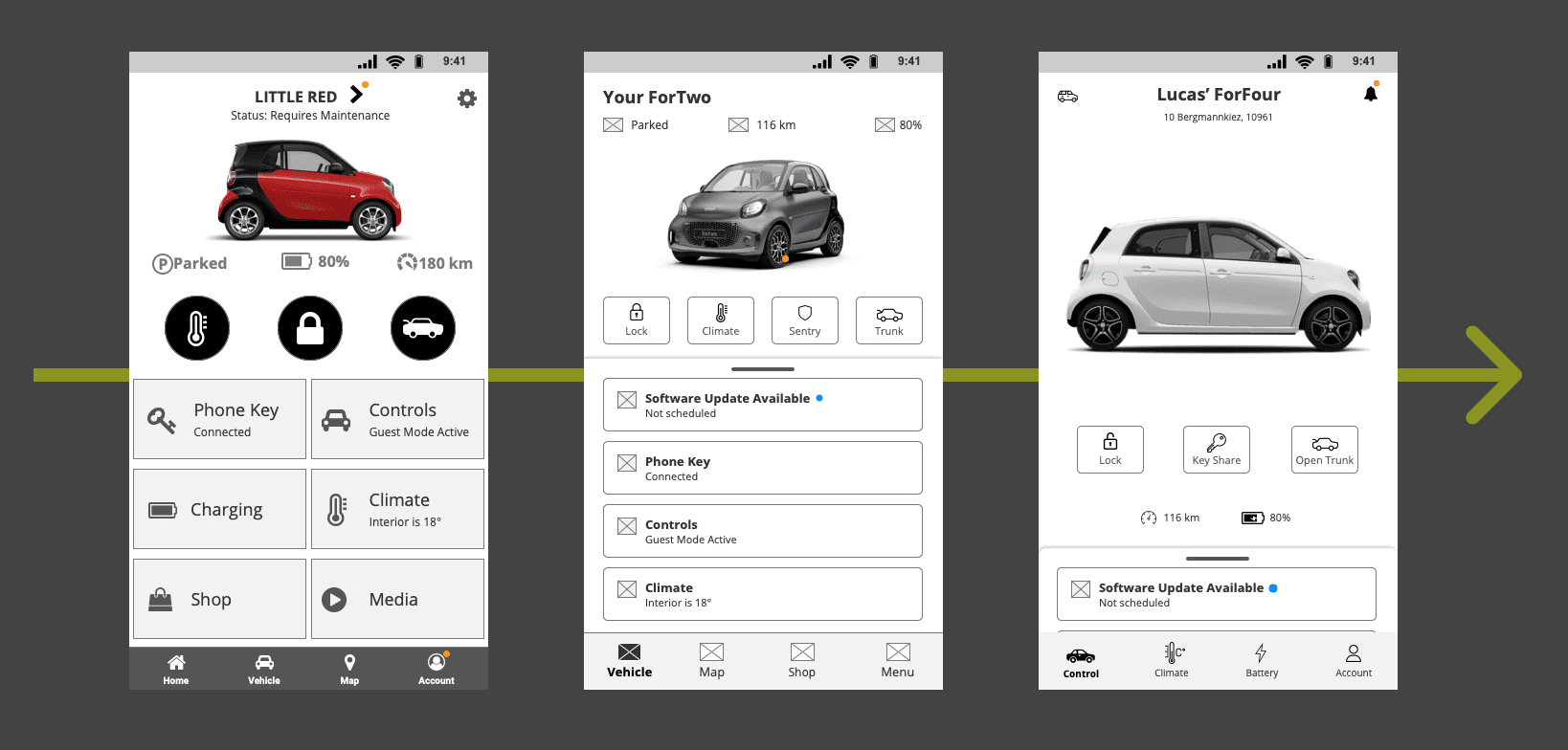
Core screens
Testing
Usability testing narrowed the fixes
In one formal round, eight participants tested core Controls and Climate functionality. Participants completed the main tasks, while the notes pointed to smaller changes in labels, feedback, hierarchy, and comprehension.
Vehicle switching validated the garage model
The matrix records successful task completion for changing to a second vehicle. That supported keeping the garage model intact.
Seat-heating levels needed clearer labels
Two participants did not understand the seat-heating level at first. The follow-up recommendation: add the seat-heat level to the label.
Loading feedback affected control confidence
Participants struggled more when the loading state appeared during the seat-heating task. That made feedback part of the control design.
Controls and climate needed a clean boundary
The formal test covered Controls and Climate prototypes. The follow-up work kept frequent controls visible while moving deeper actions into more appropriate sections.
Testing evidence
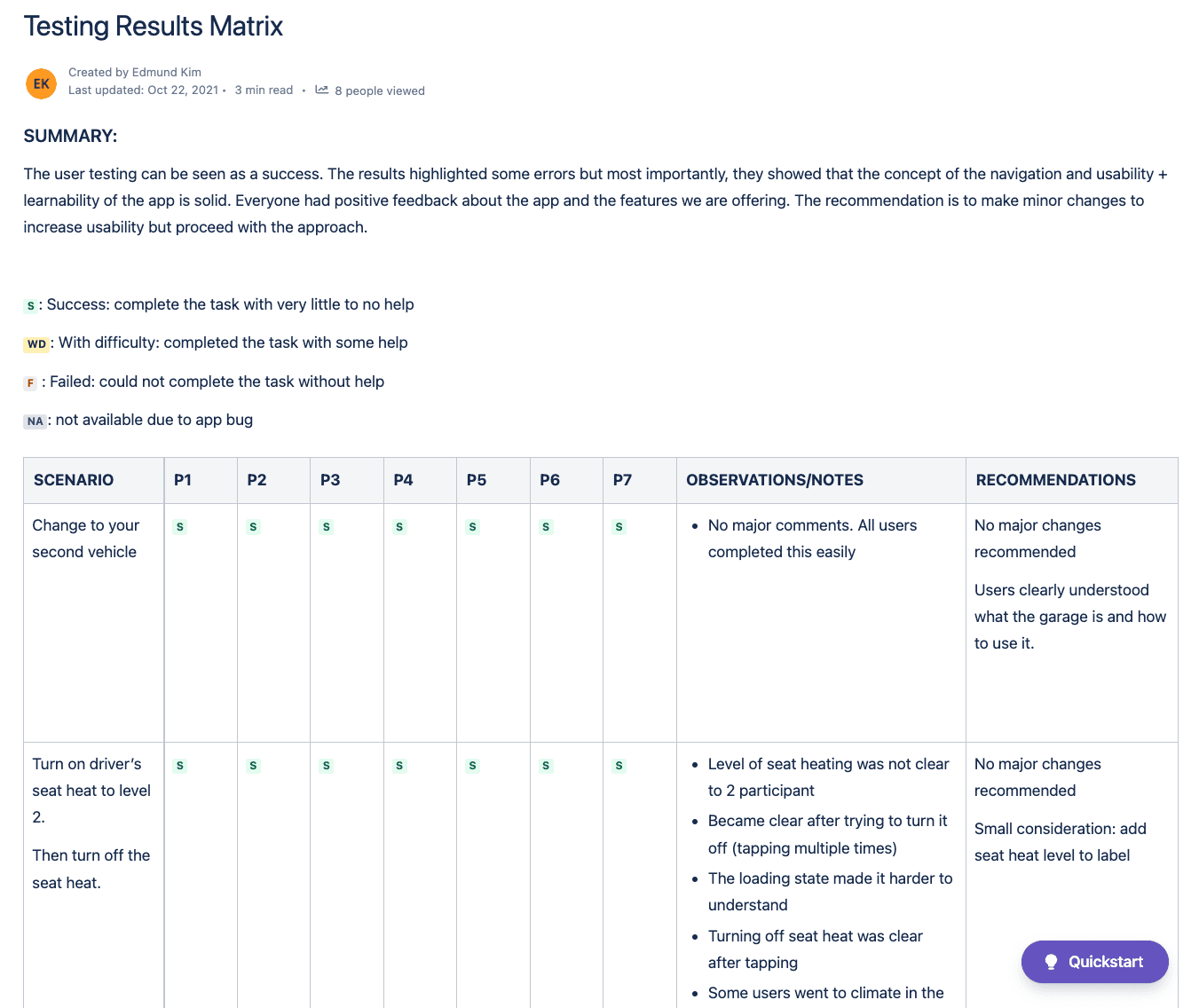
Outcome
A pre-launch product direction moved into implementation
My engagement ended before public launch, so I do not claim adoption or business impact. The useful outcome happened earlier: the team moved from a broad connected-car brief into implementation with a clearer product model, tested flows, and artefacts that exposed state logic before build.
The case shows how I reduced ambiguity across access, status, charging, climate, controls, and service moments while the car, app, and partner systems were still moving.
The programme reached implementation with a native-app structure, detailed flows, prototypes, and testing inputs that helped the team clarify product behaviour before the experience reached users publicly.
Because I was not involved after release, this page intentionally avoids adoption, business-impact, or post-launch quality claims.